Sabel handles
the plan. You do the work.

A free iPhone app that plans your strength training.

Download Sabel
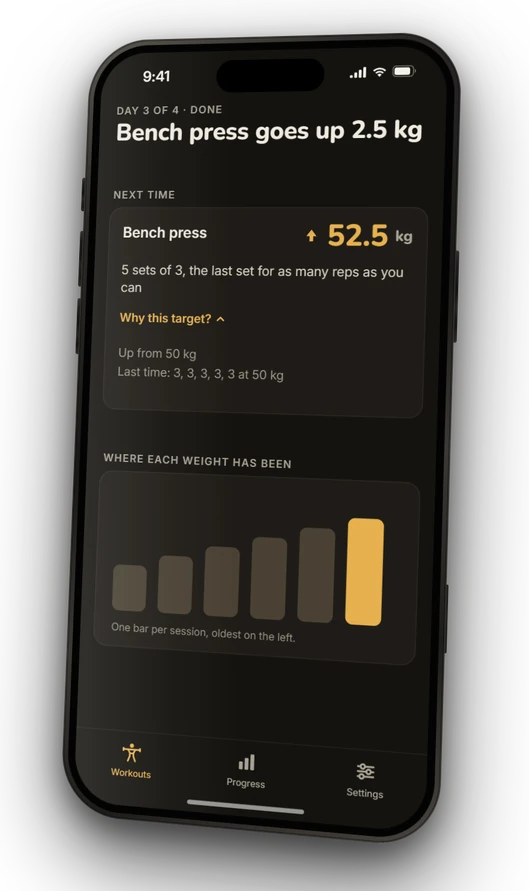
Sabel after a finished workout: bench press goes up 2.5 kg, to 52.5 kg next time.

We know the struggle

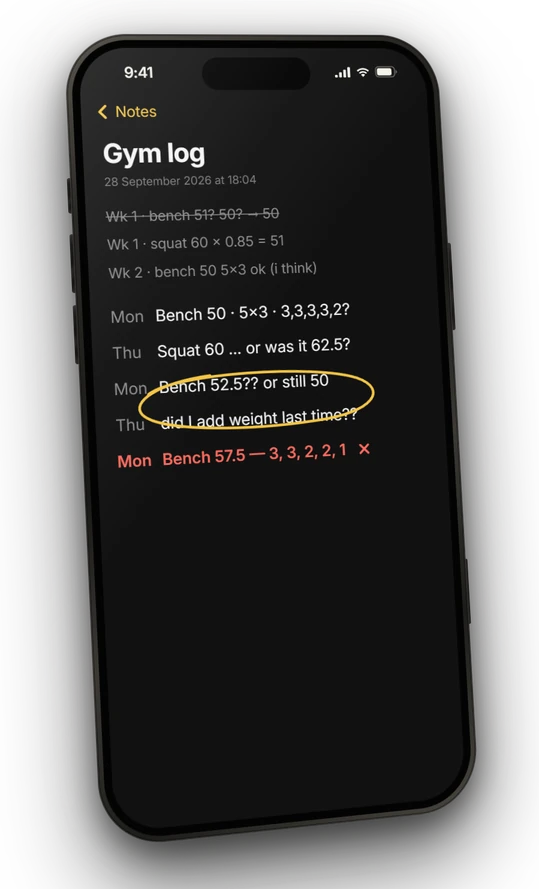
Last week’s weights in the notes app. The program’s rules somewhere else. A calculator for the next weight, and a guess when a set goes wrong. Keeping track of it all took more energy than the lifting.

That’s why we built Sabel. Set it up once, and it plans every session from what you actually lift.

Skip ahead and try it
A notes app full of guesses: “Bench 52.5?? or still 50” and “did I add weight last time??”.

01 SET UP ONCE

Tell Sabel where you’re starting

Pick a program and enter a starting weight for each lift. Sabel works out every session’s weights from the program’s rules.

ONE FIELD FROM SETUP

Bench press

FIVE-REP MAX60 kg

Main-lift starting weight 50 kg

Your starting numbers, interpreted by the program.
02 DO THE SESSION

Lift, then tap the set

Open Sabel at the gym and today’s weight, sets and reps are already there. In this example that’s 50 kg, five sets of three on bench press. Tap each set when you’ve done it.

MAIN BENCH · DAY 3

Bench press

50 kg

33333+

Weight, sets and reps, ready to follow.

03 FINISH

Next time is already planned

Press Finish and Sabel checks your sets against the program’s rules. All fifteen reps at 50 kg means 52.5 kg the next time bench press is your main lift. Miss some, and it adjusts the plan instead.

Try it yourself below
FINISHED

50 kg · 15 reps

NEXT MAIN BENCH

Bench press

52.5 kg

5 sets of 3 · final set 3+

A new prescription, with a record behind it.

Try it right here

Tap the sets below as if you just lifted them, then press Finish. Sabel works out your next bench press and tells you why. No download needed.

The interactive sample uses JavaScript. Here is one example of the same progression:

50 kg · 5 sets of 315 reps completed52.5 kg · 5 sets of 3

Finish below 15 total reps and the next main bench session stays at 50 kg, with 6 sets of 2. The final set of each stage allows extra reps.

A sample with made-up numbers and one lift. Nothing here touches your training, and it resets when you reload.

How does Sabel work out the next weight?

What Sabel checks

With GZCLP, Sabel judges the completed reps and loads against the program’s target. Meeting it can increase the weight. Missing it can change the rep stage. Your next session comes from the work recorded before it.

This sample holds every set at the displayed weight and follows the main-lift stages: 5×3, 6×2, then 10×1, each with extra reps allowed on the final set. A missed third stage needs a new five-rep max, which the real app asks you to enter.

Where the rules come from

After a successful GZCLP workout, extra reps on the final set can earn a small, capped credit in Sabel. Here, that credit is rounded down to the 2.5 kg plate grid and capped at 2.5 kg, before the normal 2.5 kg increase.

5/3/1 works differently: Sabel calculates its working weights from a training max and the current cycle. Training-max progression happens between cycles.

For weeks that don’t go to plan

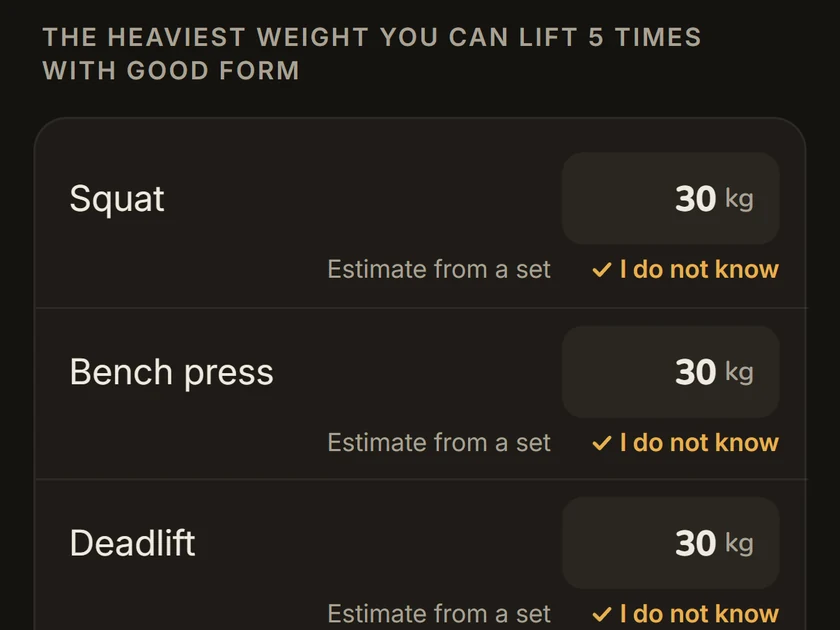
Sabel’s start screen with 30 kg filled in for squat, bench press and deadlift after tapping “I do not know”.

Start without knowing your numbers

Tap “I do not know” and Sabel fills in the lightest start the program allows. It’s light on purpose, so there’s room to go up.

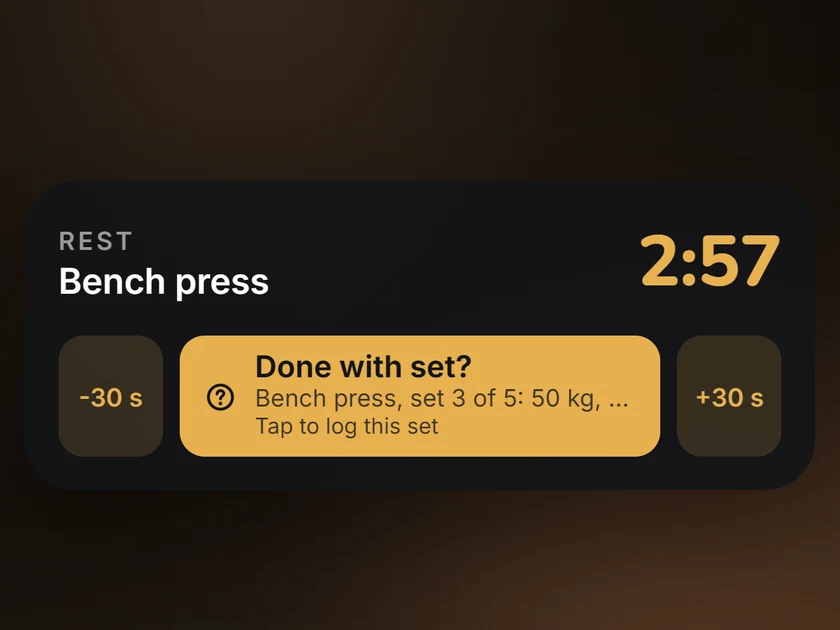
Sabel on the iPhone Lock Screen: the rest timer and a “Done with set?” button for bench press.

Log sets from the Lock Screen

Between sets, tap “Done with set?” on the Lock Screen. Sabel logs the set and starts your rest timer, without opening the app.

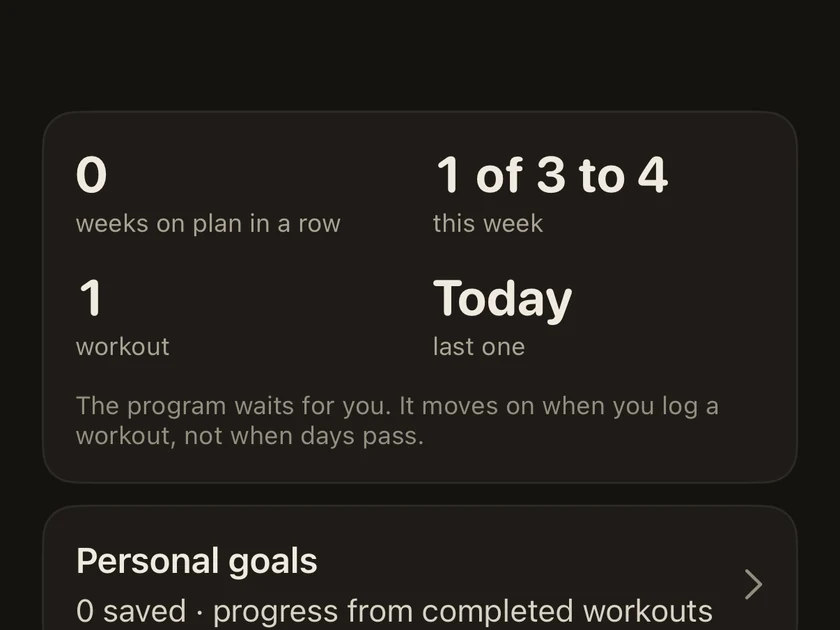
Sabel’s progress screen: “The program waits for you. It moves on when you log a workout, not when days pass.”

Miss a week and pick up where you left off

The program moves on when you log a workout, not when days pass. Come back after a busy week and the session you were due is still next.

What it looks like in the app

Two real screens, from two different days.

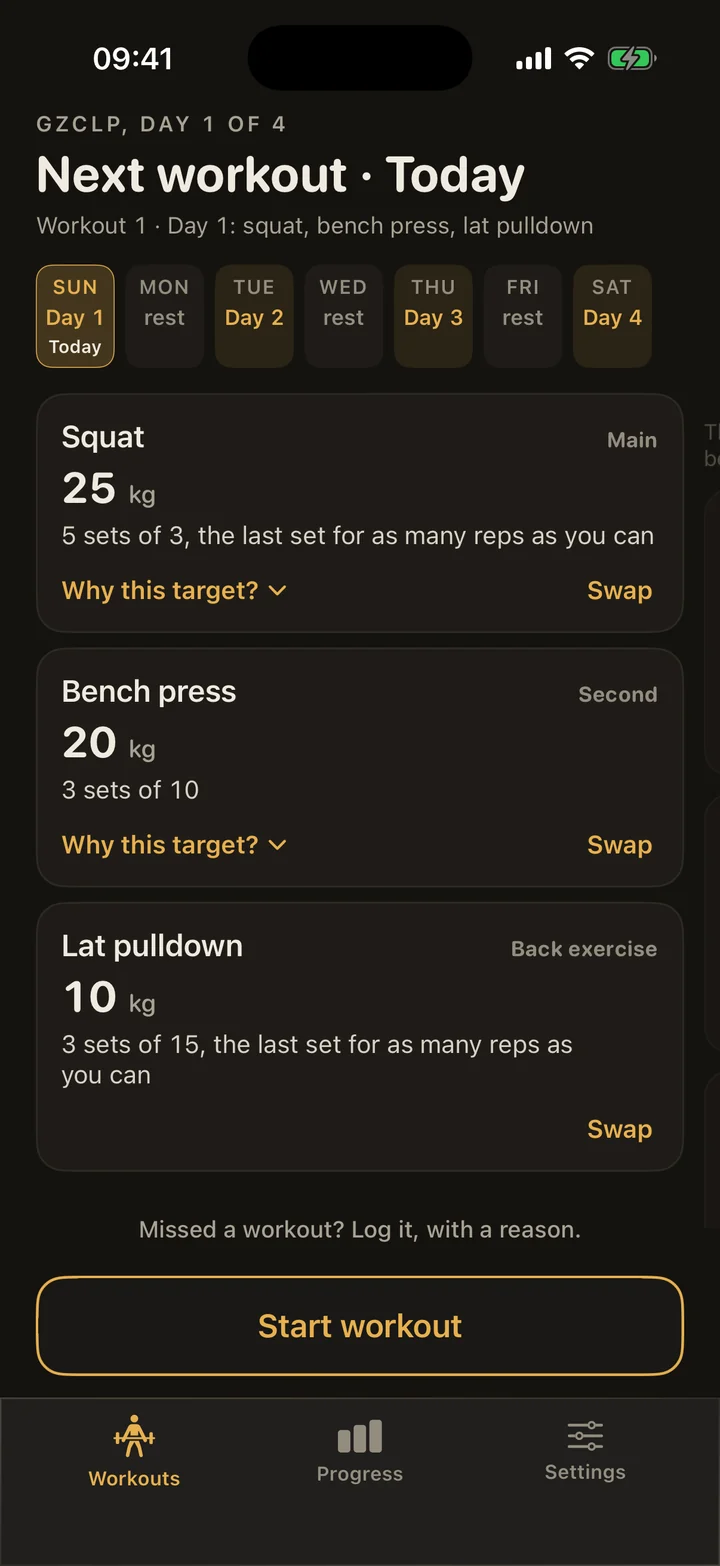
A separate GZCLP day in Sabel: squat, bench press and lat pulldown, each with its prescribed weights, sets and reps.
Your program, laid out as a session.

Programs you can follow today

GZCLP

5/3/1
for Beginners

Meet the programs

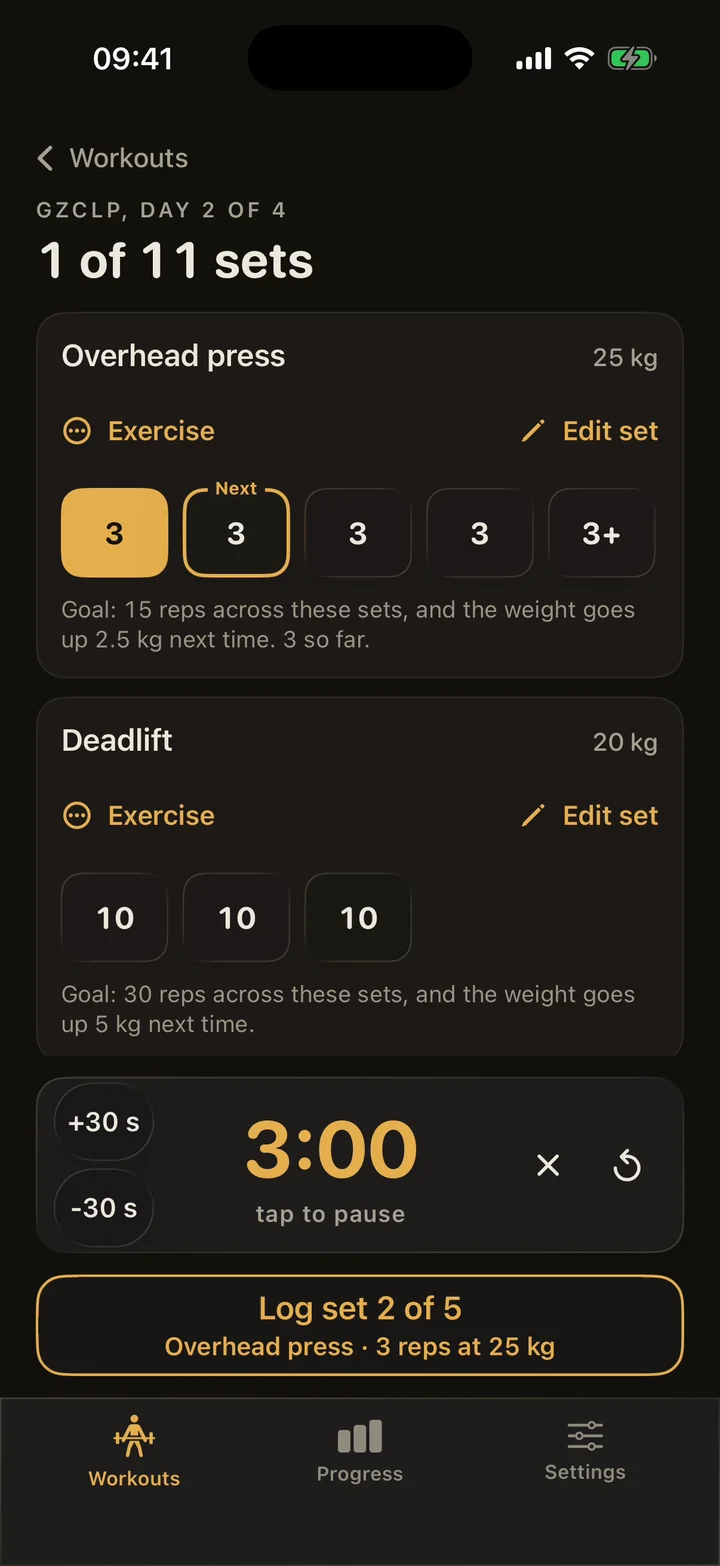
Your next set and your rest, together

Log the set you just did and the rest timer is right there, with the next set ready. You can get on with the session.

Another Sabel workout: one set logged, the next overhead press set highlighted, and a three-minute rest timer.
The next set and your rest, in one place.

The two programs in Sabel today

Both have clear rules for when the weight goes up, which is exactly what Sabel keeps track of.

Goes up workout by workout

GZCLP Linear progression

Cody Lefever’s GZCLP is a linear progression program built around the squat, bench press, deadlift and overhead press. It combines a main lift, supporting work and higher-rep assistance, with small increases in weight as you meet the targets.

Sabel keeps track of the progression rules and lays out your next session’s weights, sets and reps. GZCLP explained, step by step

Cody Lefever’s original guide

Goes up cycle by cycle

5/3/1 for Beginners

Jim Wendler’s 5/3/1 for Beginners uses three sessions a week and weights based on a training max, which is a deliberately conservative weight. Sets, reps and percentages change across a repeating three-week cycle, with gradual progression between cycles.

Sabel calculates the working weights and keeps your place in the cycle.

Jim Wendler’s original guide

Your data stays on your iPhone

Sabel doesn’t send your workouts to us. There’s no account to make, it works without a signal, and you can export a full backup whenever you like. If you want, it can also save workouts to Apple Health with heart rate and active energy. That needs iOS 26 or later and stays off until you turn it on.

Get Sabel

SabelFree on iPhone. No app account needed.

Download for iPhone